
How to send the patient the access email to the app?
Send the Almendra patient app access email when registering a patient or from their profile, check whether they have logged in, and resend it if needed.
Updated August 8, 2024
This is the case when your patient has not yet accessed the app. To allow your patient to access their account, you will need to send them the access email to the app.The access email is used so that your patients can create their password. They will be able to access the app with their profile email and the password they created.There are two ways to send the access email to the patient:1.1) During patient registration

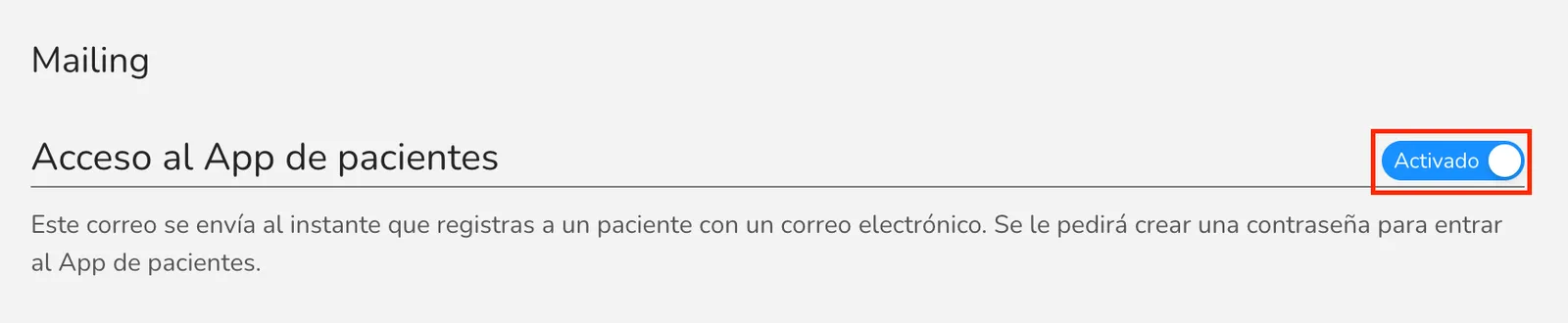
During patient registration, after entering the patient’s email, the option “Send access email?” will appear. Select “Yes.” When you register the patient, the access email to the app will be automatically sent to the email address you entered.If you cannot see this field, it is because your setting is disabled. To enable it, go to “General Settings” > “Mailing” and check the “Patient App Access” option. The configuration should look like the following image.
1.2) From the patient’s profile

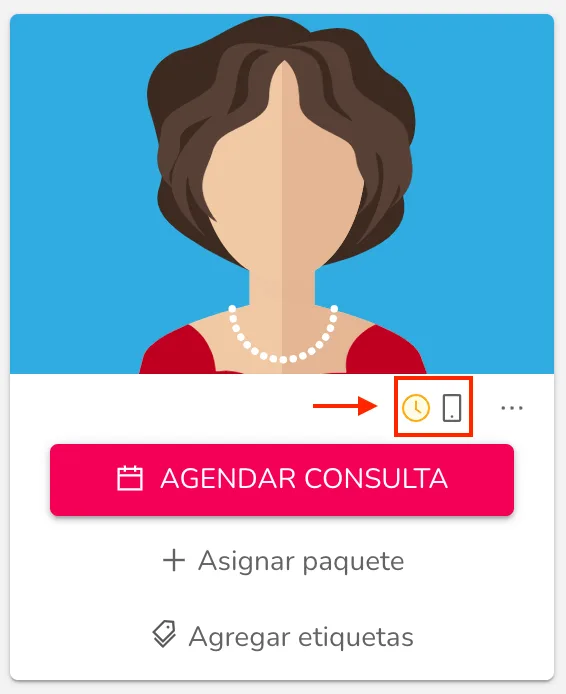
**How can I know if the patient has accessed the app?**To check if the patient has accessed the app, go to their profile. Below their image, you will see a phone button. This button may or may not have an indicator showing different states. The possible states are:**1. The patient has not accessed the app because you haven’t sent the access email yet: the button will not have an indicator.****2. The patient has not accessed the app yet, but you have sent the access email: you will see a yellow clock icon to the left of the button.**3. The patient has accessed the app: you will see a green check icon to the left of the button.
I’ve already sent the access email to the patient; how do I resend it?

To resend the access email to the patient, go to their profile and click on the phone button below their image. Since you previously sent the access email, you will see a yellow clock icon to the left of this button. A prompt will appear asking if you want to resend the access email to the app.Remember that your patient can download the Almendra app from the Apple App Store or Google Play Store.
When the patient enters the access email and creates their password, we will invite them to download the app.
Can’t find what you’re looking for?
Our team replies within 1 business day, Monday to Friday 9:30 AM – 6:00 PM (GMT-5).