
What happens if a patient wants to change their email address?
Change a patient's email in the Email field of their Almendra profile and choose whether to send a confirmation so they can log in with the new address.
Updated January 7, 2022
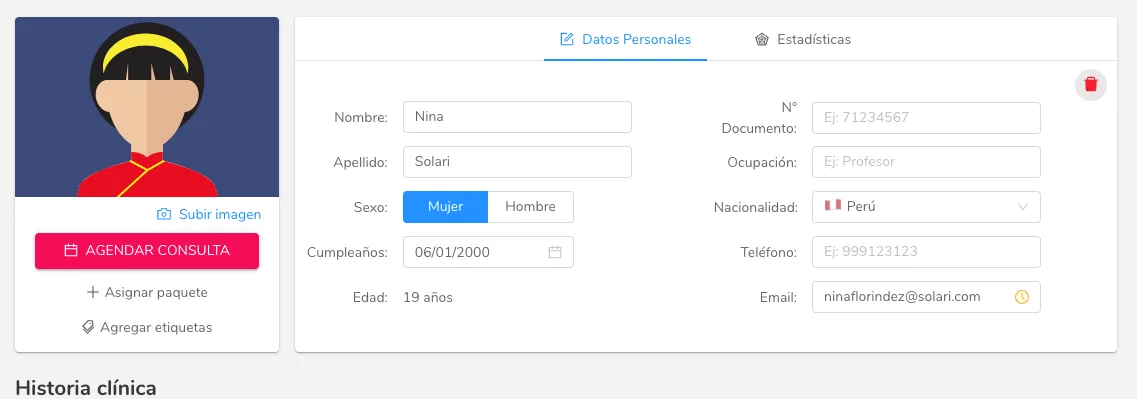
If you want to change a patient’s email address, whether because of a typo or because the patient asked to use a different email address, you can do it from their profile.
Simply go to the patient’s profile and change the “Email” field
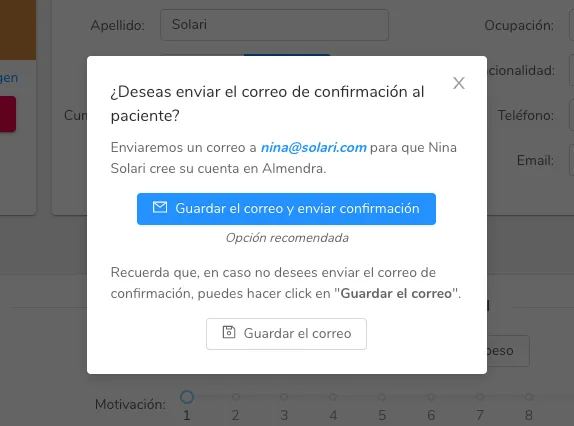
When you change it, you’ll see the message below. Click “Save email and send confirmation” if you want the patient to be able to access their account with that new email. If not, just click “Save email”
Can’t find what you’re looking for?
Our team replies within 1 business day, Monday to Friday 9:30 AM – 6:00 PM (GMT-5).