
It says the weight is missing in the targets section, but I already added it in the appointment
A meal plan takes weight and height from its linked appointment in Almendra. Find that appointment in the measurement history and add what's missing.
Updated January 6, 2022
This is a common point of confusion and there’s nothing to worry about. You’re probably seeing something similar to this right now (with the X marks and checkmarks depending on your case):
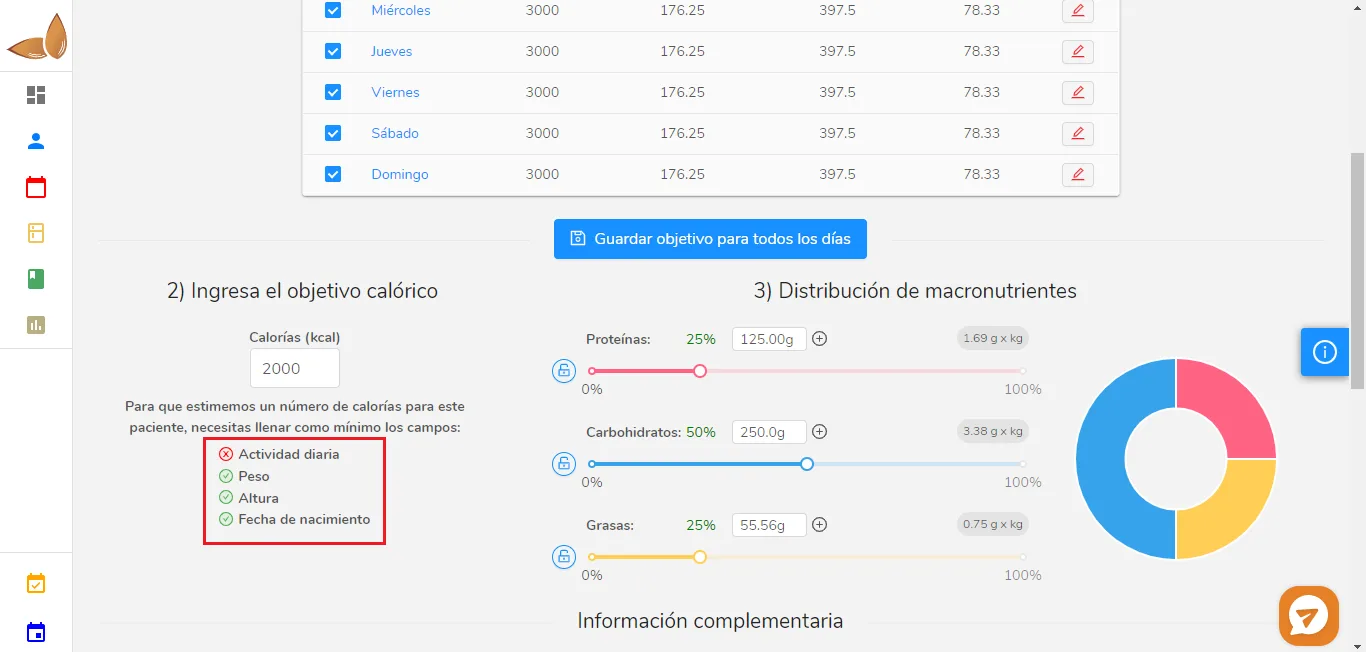
In this case, the example patient doesn’t have their physical activity recorded yet. In your case, the X may also be on weight, height, or date of birth.
It’s important to remember that every meal plan is linked to an appointment, since the patient’s measurements are taken during the appointment, and that’s where the weight and height come from.
To check which appointment is linked to which meal plan, go to the patient’s meal plans table and look just below the meal plan’s name:
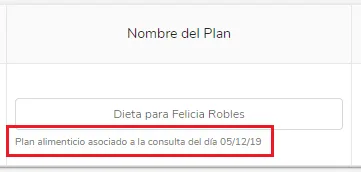
Now look at the measurements history table (it’s just above the meal plans section, just scroll up a little) for the row that matches the linked appointment. In this case, the linked appointment is the one from 05/12/19.

The patient only has one appointment, so there’s only one row. You can see that weight and height were recorded in that appointment, which explains the checkmarks next to “Weight” and “Height” in the caloric target image (first image).
So, the possible causes and solutions for this situation are:
Cause 1: You forgot to record the weight or height in the linked appointment.
Solution 1: Contact the patient so they can send you their weight or height and you can record that measurement directly in the measurements history, or schedule the patient again so you can take the measurement yourself.
Cause 2: You’re in an appointment and opened a meal plan from an appointment that was missing a measurement.
Solution 2: Check the linked appointment for that meal plan (see the second and third images) and make sure you’re in the meal plan for the correct appointment based on the dates. You may have created the appointment without measurements by mistake and then finished it. If that was the case, remember that if you create an appointment by mistake, you should delete it while it’s in progress instead of finishing it, since it can cause this kind of confusion.
Can’t find what you’re looking for?
Our team replies within 1 business day, Monday to Friday 9:30 AM – 6:00 PM (GMT-5).