
How does Almendra check my patient's allergies and tastes?
What Almendra checks when you fit a template: the 14 allergens and lactose, other allergies, dislikes and favorites, and how it picks swaps.
Updated October 21, 2026
When you fit a template to a patient (How do I fit a template to each patient?), Almendra compares every food of the chosen meals with the patient’s record and suggests swaps. Here’s what it checks, how it picks the swaps and what to keep in mind.
The check helps you not miss anything; it doesn’t replace your judgment. Always confirm ingredients and product labels, especially for severe allergies.
Where the information comes from
Almendra uses the patient’s record:
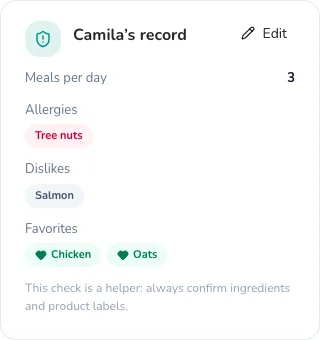
- Allergies and intolerances you ticked. You tick them in their record, under Liked Foods → Foods allergies, or on the template screen with Edit in …’s record. It’s the same list: what you tick in one place shows in the other.
- Other allergies (specific foods), Dislikes and Favorites: the fields in that same section of their record (Foods allergies, Unliked Foods and Liked Foods). If you type a group, like “tree nuts”, its box gets ticked.
- Lactose intolerant or Gluten intolerant, if you ticked them in their Special diet conditions.
What counts as what
| On their record | What Almendra flags | Example |
|---|---|---|
| Tree nuts | walnuts, almonds, hazelnuts, pistachios, cashews, macadamias… and recipes that contain them | Walnuts → allergy |
| Milk | milk, yogurt, cheese, butter, cream, kefir… (not plant drinks) | Almond milk → not milk (tree nuts, yes) |
| Lactose | the same as milk, except what says “lactose-free” | Lactose-free milk → fine |
| Gluten | wheat, barley, rye, oats, bread, pasta, cookies… except what says “gluten-free” | Gluten-free bread → fine |
| Fish, Crustaceans, Molluscs | tuna, salmon, hake… / shrimp, prawns, crab… / mussels, squid, octopus… | “shellfish” flags crustaceans and molluscs |
| A typed allergy, for example kiwi | foods with that word in their name | Kiwi → allergy |
| Dislikes: Salmon | foods with that word in their name | Grilled salmon → dislike |
| Dislikes: Vegetables | a group works too: foods of that category | Broccoli (Vegetables) → dislike |
| Favorites: Chicken | offered first among the swaps, with a ♥ | Chicken breast ♥ |
Recipe ingredients are checked too: a recipe with yogurt shows up for a patient allergic to milk.
Foods from the composition tables (BEDCA, CENAN, USDA, SMAE, TACO, etc.) also have their allergens identified, so they’re caught even when the name doesn’t say it (for example, cookies made with milk and eggs). For foods you create yourself, Almendra goes by the name and the ingredients.
Words are compared without accents and in singular or plural: “walnuts” finds Walnut, “carrots” finds Carrot.
Allergy, intolerance or dislike
| Type | How it looks | Can it be kept? |
|---|---|---|
| Allergy | red tag | No |
| Intolerance (lactose) | amber tag | No |
| Dislike | grey tag | Yes, with Keep |
If they’re allergic to milk, you don’t need to tick lactose too: it’s included. Gluten intolerance is checked like an allergy (coeliac disease).
How swaps are picked
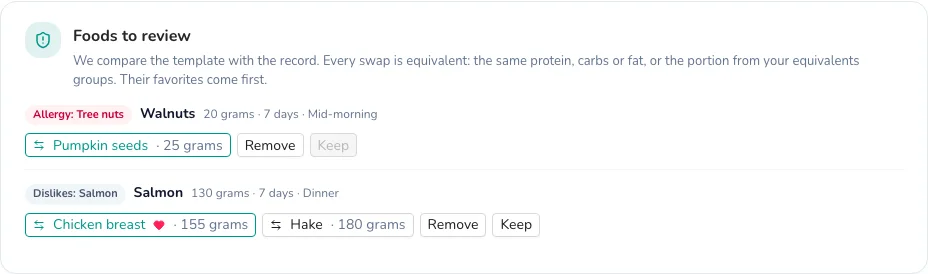
For each food, Almendra looks for up to three swaps in this order:
- Your equivalents groups: if the food is in one of your groups (in Equivalents), you’re offered the group’s other foods with the equivalent portion you set. For example, if in your “Fats” group 20 g of walnuts equal 25 g of pumpkin seeds, that’s the swap.
- The same table and category: foods from the same composition table and category (for example, other fish), in the amount that gives the same of its main nutrient:
- if most of its energy comes from protein (fish, chicken, eggs…), the same protein;
- if it comes from carbs (bread, rice, fruit…), the same carbs;
- if it comes from fat (nuts, oil…), the same fat;
- if none dominates, the same energy.
Their favorites come first, and you’re never offered something that also clashes with their record. If a food appears on several days with different amounts, each day gets its own equivalent amount.
The first swap comes selected. If there’s none, allergies and intolerances default to Remove, and dislikes to Keep. You can change the choice anytime before creating the plan.
To get better swaps, create equivalents groups with the foods you usually use: they’re the source that best follows the way you work.
In the plan editor and Almendra Engine
The same rules apply outside templates:
- In the plan editor, each food’s name is coloured: red if it clashes with an allergy or intolerance, orange if they don’t like it, and blue if it’s one of their favorites. When you search for a food that clashes with an allergy, Almendra warns you before adding it.
- Almendra Engine leaves out foods and recipes that clash with their allergies, intolerances and dislikes (What is Almendra Engine?).
In both cases, both the ticked boxes and what you typed count.
In exchange and free-text plans
- Exchanges: foods aren’t swapped one by one. The foods of the exchange groups that clash with their record are excluded from their lists, so the patient doesn’t see them as an option. Foods to review shows which ones are excluded from each group.
- Free text: Almendra checks every line of the chosen meals and shows you the ones that mention something on their record (for example “Toast with peanut butter” for a peanut allergy), so you can fix them in the plan.
What it doesn’t do
- It doesn’t detect traces or cross-contamination.
- It doesn’t know specific commercial brands: a food you created without ingredients is checked by its name only.
- It doesn’t change your template or the patient’s record unless you save it.
If something isn’t caught right, change it by hand in the plan and write to us from Support: it helps us improve the check.
Can’t find what you’re looking for?
Our team replies within 1 business day, Monday to Friday 9:30 AM – 6:00 PM (GMT-5).