
I can't find the household measure I want for a food. How do I add it?
To add a household measure to a food, click its unit in the meal plan, choose Create new measurement and enter a name and its weight in grams.
Updated January 6, 2022
Go to the meal plan that contains the food you want to add the household measure to. Click the current unit (in the image below it’s “grams”)
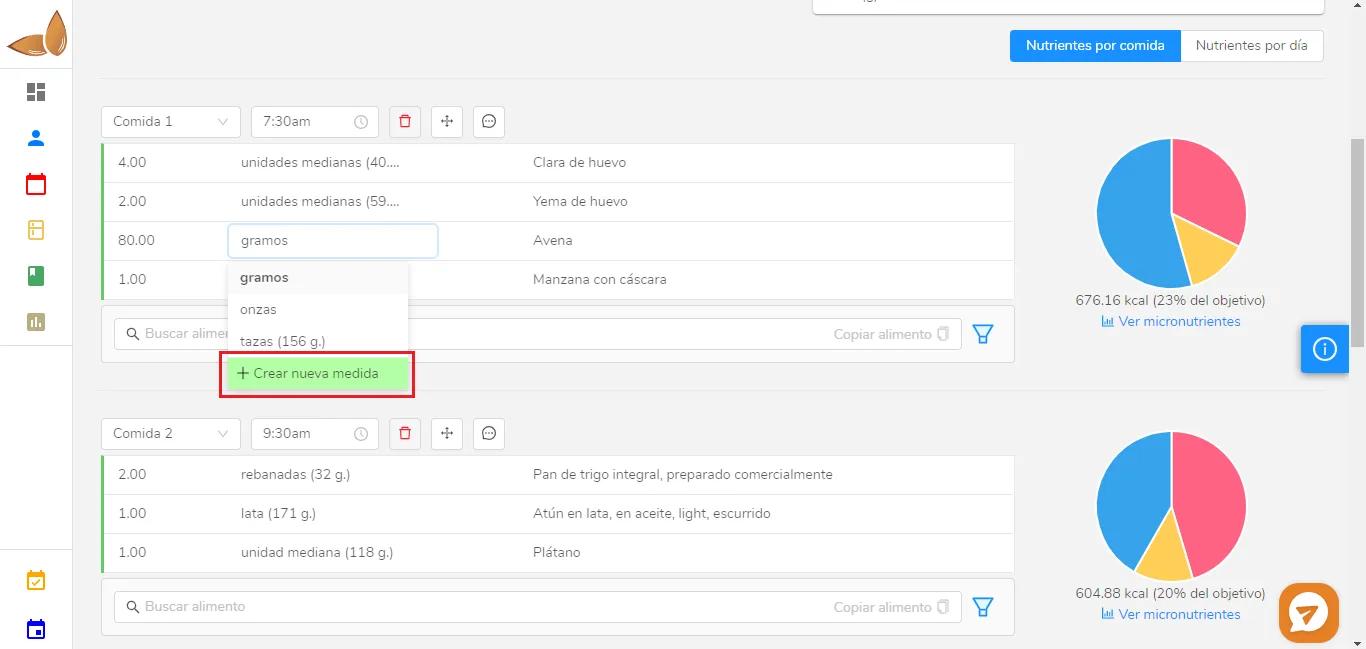
The available measures for the food (in this case, Oats) will open. The measures that appear for every food are grams and ounces. Many foods already have household measures built in, in this case “cups”, where 1 cup equals 156 grams.
To create the measure, click “Create new measurement”, and the following window will open:
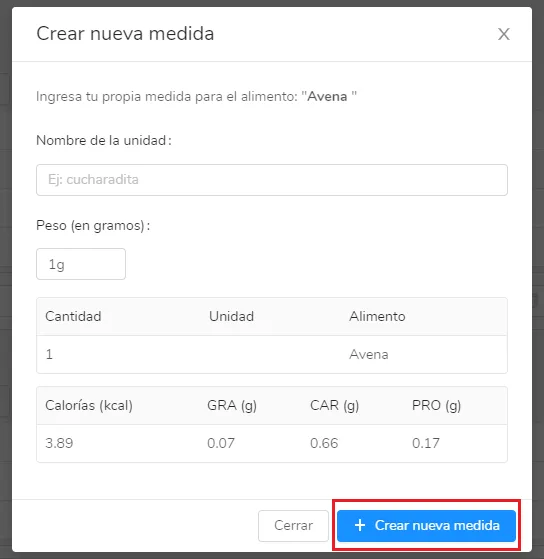
Fill in the corresponding fields (name and weight in grams) and you’ll see that the macronutrients are calculated automatically. When you’re done, click “Create new measurement”. Every time you want to use that food (in this case Oats)
Can’t find what you’re looking for?
Our team replies within 1 business day, Monday to Friday 9:30 AM – 6:00 PM (GMT-5).